Aside vs Ego Lite: If You Had to Pick Just One of These Buzzed-About AI Browsers?
Key Takeaway
If you already work through Codex or Claude Code, try Ego Lite first. If you want to manage models, research and recurring work inside the browser, start with Aside.

For an initial comparison, choose a task whose results you can check, such as reading the official pricing pages of three competitors and organizing them in the same format. The sources checked for this article did not include a public comparison of the two products under identical conditions. The suggestions below are based on how the products work and what their public documentation says.
The information was checked on October 29, 2026. Versions and prices can change, so the relevant sections link to the originals. Without RAM measurements from the same machine under matching conditions, there is no basis for saying which uses less memory.
Which browser fits the way you work?
| What you need to do | What to try first | Reason |
|---|---|---|
| Ask an existing coding agent to research logged-in websites and inspect pages | Ego Lite | ego-browser connects an external agent to the browser |
| Manage models and tasks within the browser | Aside | Model-provider settings, tasks, research mode and routines are available within the product |
| Browse yourself while agent tasks run in parallel | Start with Ego Lite Spaces | The product separates your tabs from agent workspaces |
| Repeat a predefined web task | Start with Aside routines | The plans specify routine counts and usage conditions |
| Work on a company PC with little RAM | Keep the decision open | Published token counts and installation sizes do not substitute for RAM measurements |
A Space is a workspace inside Ego Lite. The official description gives examples of Claude Code enriching sales-lead information while Codex researches competitors' websites. These are uses suggested by the developer, not data showing how common each use is among customers. Aside also documents a CLI for external development tools, so the distinction is not that Aside cannot connect to external agents. The choice depends on where you want to start and manage the work. Ego Lite introduction, Aside documentation, Aside pricing
Who built them, and where are the companies based?
Aside: from answering questions during sales calls to working across the web
Aside was created by a Korean founding team. In a founder interview, Chanhee Lee described building the product from a startup coworking space in Seoul. Y Combinator's company profile, meanwhile, lists San Francisco as its location. A founder's background, the team's workplace and the location in a company profile are different pieces of information. Aside company profile
Aside's Y Combinator company page lists its founding year as 2024, its batch as Fall 2025, and its co-founders as Jun Kim, Chanhee Lee and Sanghun Lee. The current product description presents a browser that carries out work across websites, including email, dashboards, internal tools, documents and spreadsheets. YC company profile
The earlier launch post preserved on the same page describes a different starting point. At that time, the service listened to sales calls and searched company documents, Slack and previous calls to help answer technical questions. The founders explain that Jun and Chanhee were early engineers at Airbridge, and that Jun's experience answering technical questions in sales helped inspire the product. Read together, the current description and the original launch post suggest an expansion from sales-call support to a broader range of web work. The page does not establish the exact timing of that transition or explain the management decisions behind it. YC page with the original launch post
That history helps explain the product's emphasis: completing work with several steps and connecting previous context with company tools. This is an interpretation of its public description, not evidence that it performs better on every task.
Ego Lite: giving existing agents access to the web people use
Ego Lite's operating company, CITRO LABS PTE. LIMITED, is registered in Singapore. Its official privacy policy gives a Singapore registered address, and CitroLabs' official GitHub profile also lists Singapore. The company's LinkedIn profile lists San Francisco, United States, as its headquarters. The Singapore operating entity and the US headquarters listing describe different aspects of the company. These sources do not establish the developers' nationalities or that all development takes place in one country. Ego Lite privacy policy, CitroLabs official GitHub
CitroLabs says on its official site that it is building AI that understands personal context while keeping users in control, starting with Ego Lite. Agents such as Codex and Claude Code can use sites where the user is signed in, within separate Spaces. The company describes running locally where possible. That does not mean every task connected to an external model is processed entirely on the PC. About CitroLabs
The product-development article describes two starting problems with existing tools: login sessions did not carry over reliably, and people and agents competed for control of tabs. The team responded by building a browser and letting agents combine multiple actions into JavaScript executions. The official article introduces Aute as Founder & CEO and Brax as Growth. Those public names alone do not establish legal identities, funding history or company size. Ego Lite's development background
The repository's license does not automatically cover the browser application. The README says the repository contents are MIT-licensed and the browser is a separate free download. A public repository alone does not establish that the entire browser source is available under that license. Ego Lite repository
Which version numbers should you check?
| Item | Official record checked on October 29 | How to read it |
|---|---|---|
| Aside browser application | v1.0.1022.1, the top entry in the native-app changelog | The entry does not give a publication date, so none was inferred from its version number |
| Aside components | v1.26.1029.43, October 29 | This is a component record, separate from the browser application's version |
| Ego Lite macOS | 0.6.1.11, October 26, the top entry on the macOS tab | Do not assume its number matches the Windows version |
| Ego Lite Windows | 0.6.1.13, October 26, the top entry on the Windows tab | This value was checked by selecting the platform on the official page |
| Ego Lite repository release | v2.1.0 | Do not present this as the app version |
Aside native-app changelog, Aside component changelog, Ego Lite macOS changelog, Ego Lite Windows changelog, Ego Lite repository
Aside's native-app record lists Windows ARM64 support, separate macOS distributions for Apple Silicon and Intel, and Chromium 154.0.8037.100. Ego Lite's 0.6.1.9 entry lists Chromium 156.0.8078.48 and bundled Node.js 24.22.1. A higher engine version number does not establish an overall advantage in task speed, accuracy or security. Aside native-app record, Ego Lite changelog
Ego Lite's October 15 product article places Windows on its roadmap, but the current repository lists support for macOS and Windows, and the official changelog has Windows entries. When installing, use the current platform-specific instructions rather than an older article's planned-support wording. Linux remains on the roadmap in the README checked for this article. Product article, Current installation instructions
If the browser is free, do models still cost extra?
The browser reads page state and provides actions such as clicking, typing and navigation. The connected agent and model interpret your request, choose the next action and organize the results. Even with the same browser, results can differ with the model, reasoning effort, account limits and prompt.
| Aspect | Aside | Ego Lite |
|---|---|---|
| Where model selection starts | Settings → Models in the browser | Model settings in the connected agent, such as Codex or Claude Code |
| Connection options | Aside plan models, supported existing subscriptions, API keys | External agents connect through ego-browser |
| Examples in the public documentation | ChatGPT Plus/Pro, Claude Pro/Max and GitHub Copilot subscription connections | Codex, Claude Code, Cursor or a custom agent |
| Where to check costs | Check Aside credits and connected subscription/API usage separately | Check agent subscription/API usage separately from whether the browser is free |
Aside AI-provider settings, Ego Lite connection design
Aside's API-provider documentation lists Anthropic, OpenAI, OpenRouter, Google, xAI, Vercel AI Gateway and Cloudflare AI Gateway. The October 29 component record says GPT-6.1 Terra is available and that the Claude model list reflects the account's access. Mythos 5.1 is also limited to accounts with access. A provider appearing in the list does not establish that your account can select a particular model; check the model list available to your account. Provider documentation, October 29 model changes
Ego Lite does not limit you to one fixed model. It connects to an external agent, and the models you can use depend on that agent's support and your account. The gpt-5.6-sol used in a public benchmark is the model for that test, not a model fixed across all Ego Lite tasks. Ego Lite README
Calculate monthly fees and cost per task separately
The following US-dollar prices were shown with Monthly selected on the official pricing page on October 29. They are not the monthly equivalents of annual billing.
| Aside plan | Displayed monthly price | Usage and feature information |
|---|---|---|
| Free | $0 | 500 credits per month, up to 3 routines |
| Pro | $20 | 3 times the Free plan's usage, Ultrabrowse, unlimited routines |
| Max | $200 | 40 times the Free plan's usage, including Pro features |
| Enterprise | Contact sales | Team accounts, permissions and administration |
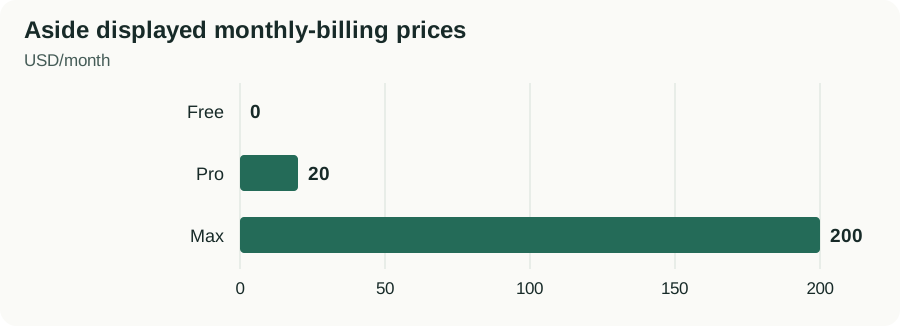
Official Monthly prices shown on October 29, 2026. Usage allowances and included features differ. Tax, exchange rates and external-model costs are excluded; Enterprise pricing requires an inquiry. Aside official pricing.
Unlimited routines does not mean unlimited model usage. Ego Lite is presented as a free browser, while external agents and models have separate costs. Even if you already pay a fixed subscription, usage limits can leave work waiting, so record additional charges and usage against your quota separately. Check actual charges, including tax, exchange rates and account-specific terms, on the checkout page and with each provider. Aside pricing, Ego Lite download information
Use four columns for a budget: browser plan, external-agent subscription, model API and completed tasks. If the relevant costs over a comparison period total KRW 10,000 and 20 tasks are completed, the cost is KRW 500 per completed task. This is a calculation example, not a price estimate for either product. Include money spent on unsuccessful attempts in the total cost. If no tasks are completed, do not calculate a per-completion cost.
How should you ask the browser to handle a task?
Researching competitors' prices
A request to analyze an entire market makes omissions hard to assess. Start with three sites, the same pricing fields and the same output format.
Read the official pricing pages of the three specified companies and make a table with plan names, monthly prices, currencies and usage limits. Put the monthly equivalent of annual billing in a separate column. Include a source link and check date for every row, and mark values that are not public as “not published.” Do not sign up or make a purchase.
Creating a table does not, by itself, complete the task. It must include all three companies, distinguish monthly from annual billing, and match the numbers and links to the originals. If one company's price cannot be found, leave it unconfirmed instead of filling the gap with an old price from another blog. This is an example of narrowing Ego Lite's competitor-research use case and Aside's research feature to your own work. Ego Lite use cases, Aside research features
Organizing a list in a logged-in administration page
Read this week's entries on the administration page I am signed into, and make a table with each entry's name, date and status. If the list spans multiple pages, state which pages you checked. Do not change statuses, delete anything or send messages. Identify duplicate entries and entries you could not check separately.
Compare the total count on the page with the number of output rows, then check missing pages, duplicates and date boundaries. If the page shows 42 entries but the output has 20 rows, first consider whether only the first page was read. The numbers 42 and 20 illustrate the checking process. Both products describe working with logged-in websites, but compatibility and accuracy for a particular company's administration page need to be checked on that page. Aside product description, Ego Lite product description
Separating recurring tasks from parallel tasks
For a daily page check, the schedule matters. For research across several independent sites, concurrency matters. Aside describes routines, while Ego Lite describes parallel work across Spaces. With either browser, check one task first. Then increase how often it runs or how many tasks run at once so you can see what changes. If multiple tasks can edit the same item simultaneously, the risk of conflicting changes is higher than in read-only research. Aside pricing, Ego Lite Spaces
Can you choose by success rate alone?
| Developer-published test | Execution and evaluation conditions | Published result | Scope of interpretation |
|---|---|---|---|
| Aside Online-Mind2Web | 300 tasks, gpt-5.5/openai-codex, high, fast, concurrency 3–6, 900 seconds per task, gpt-5.4 evaluator | 297/300, 99.0% | Excluding 1 task that could not be performed changes the denominator to 297/299, or 99.3% |
| Aside Odysseys | 200 tasks, gpt-5.5 high/fast, up to 200 steps, gemini-3.1-flash-lite evaluator | Perfect completion on 151/200, or 75.5% | The 88.8% rate for passing individual subcriteria differs from perfect task completion |
| Aside BU Bench V1 | 100 tasks, high/fast, concurrency 6; gpt-5.5 through openai, kimi-k2.6 through aside | gpt-5.5 93%, kimi-k2.6 88% | Results from a particular run, not a universal ranking of models |
| Ego Lite Real-World Bench | 31 tasks; tools compared with the same pi agent, gpt-5.6-sol max and evaluation criteria | Ego Lite 93.5%, Browser Harness 77.4%, agent-browser 62.9% | Aside is not included in this comparison |
Aside benchmark data, Ego Lite execution conditions, Ego Lite result explanation
You therefore cannot take Aside's 99.0% and Ego Lite's 93.5% and conclude that Aside is better by 5.5 percentage points. The tasks, their number and difficulty, execution models, time limits and evaluation methods differ. These are all developer-published results. Live sites change their pages, inventory and login conditions, so the same score is not guaranteed in your environment.
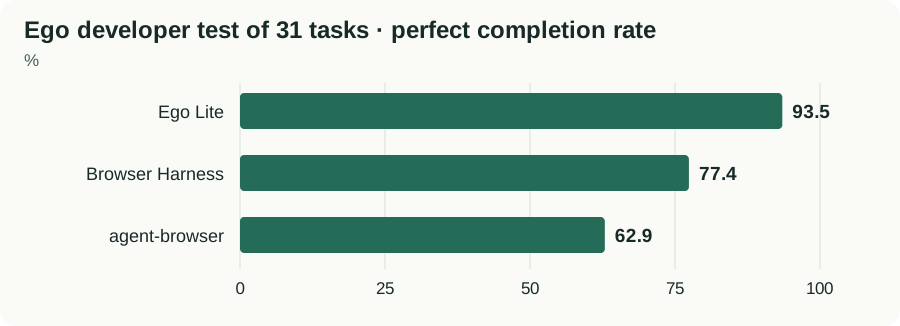
Figures published by the developer using the same 31 tasks, agent, model and evaluation criteria. Do not compare them with Aside scores from different tests. These are neither success rates for all users nor independently reproduced results. Ego Lite test results and conditions.
“63% faster” and “63% less time” mean different things
Ego Lite's homepage gives average times per task of 398 seconds for ego-browser, 587 for chrome-devtools-cli, 605 for agent-browser, 615 for Browser Harness and 648 for playwright-cli. Aside is not measured in this table. Ego Lite's published times
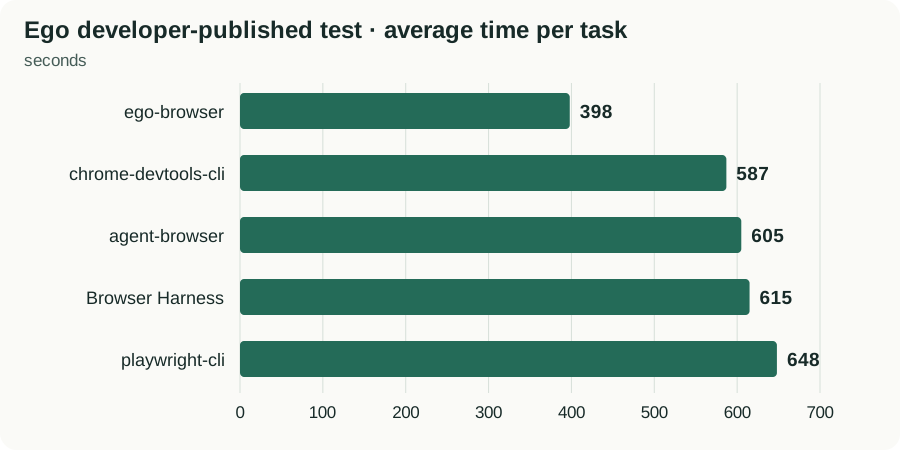
Developer-published averages; lower values indicate less time. Aside is not included. These are not measurements on your PC or expected durations for every task. Ego Lite published times.
Using those published values, the change from 648 to 398 seconds is a reduction of 250 seconds, or 250 ÷ 648 ≈ 38.6%. If processing speed is expressed as the inverse of elapsed time, it is 648 ÷ 398 − 1 ≈ 62.8% higher. The denominators differ, so translating “about 63% faster” into “63% less time” changes the meaning. Calculated in the same way, the time reduction compared with 587 seconds is about 32.2%. These are recalculations of published averages, not additional measurements.
Check whether the result is correct as well as how long it took. If you count a fast but incomplete run as a completed task, you can underestimate the cost of getting the work done correctly. Ego Lite's public framework also explains how to separate the variable being compared from task, model, evaluation and concurrency conditions. Public evaluation framework
How can you check which browser uses less memory?
The official records and public benchmarks checked for this article did not provide a comparison of Aside and Ego Lite RAM use on the same PC, operating system, number of tabs, model and task. Do not reinterpret the following figures as RAM usage.
- About 6MB added by Ego Lite's bundled runtime: the development article describes an increase in installation size.
- A smaller Aside app after splitting Apple Silicon and Intel distributions: this concerns application file size.
- About half the token usage for long-running Aside tasks: this changelog entry concerns the context and tokens sent to the model.
Runtime explanation, Aside native-app record, Aside token-related record, Ego Lite changelog
For a comparison on company PCs, use the following procedure as a starting point. Decide how often to take readings and which processes to include before you start. Do not claim to have measured a peak that fell between your readings.
- Record the environment: note the PC model, RAM, operating system, browser, integration-tool and model versions, extensions and login state. Give installation size its own column.
- Measure the idle state: open the same pages and number of tabs, then record the pre-task value. Apply the same scope to both products, whether it includes only the main browser or related helper processes as well.
- Repeat the same task: alternate the pricing-research request above between products. A suggested starting point is 5 runs per product. Five runs cannot establish performance across the whole product, but can help reveal large variation and recurring problems.
- Record during execution: check RAM and system memory pressure at regular intervals. Record the average, highest observed value and post-task value, along with the sampling interval.
- Compare task results: record correct completion, elapsed time, tokens and costs, and the number of items corrected by a person. If the external agent runs in a separate process, record its usage separately.
| Run | Product, version and model | Correct completion | Elapsed time | Idle RAM | Highest observed RAM | Relevant cost | Items corrected by a person |
|---|---|---|---|---|---|---|---|
| First | Fill in | Yes / No | Seconds | MB | MB | KRW or USD | Count |
This table is a recording template, not a set of measurements. For example, an idle value of 1GB and highest observed task value of 1.5GB represent an observed increase of 0.5GB. Depending on how the operating system accounts for shared memory, simply adding process values can double-count usage, so use the same tool and metric. Low RAM usage alone is not a good reason to choose a product if it frequently omits parts of the task.
How much can you learn from user reviews?
The author of a Korean Aside review reported that, on August 19, 2026, the free plan took 18 seconds to summarize 3 Hacker News articles and 39 seconds to check the official Pro price. These are records of two tasks from one author. Keep the free-plan and task-scope conditions attached to them; they do not establish the latest version's average speed or an advantage over Ego Lite. They do provide concrete examples of starting with article summaries and price research, where outputs are easy to check against the originals.
Ego Lite's official site presents individual experiences of connecting Claude to the browser for research and importing existing Chrome login information. The developer selected these testimonials, so they are not an independent survey of overall satisfaction. A public GitHub issue also reports that a Windows task Space was no longer visible later on. That single observation establishes neither frequency nor cause. It is better treated as a reason to check whether you can find and resume a task before relying on it for long-running work. Ego Lite introduction and user quotes
The current material is insufficient to claim that most users like a product, that businesses mainly use it for a particular purpose, or that one is much more stable. Suggested use cases, developer-selected testimonials, external authors' experiences and public issues are different kinds of information. Even with more community posts, short reactions lacking dates, product versions, operating systems and task details cannot establish adoption or satisfaction rates.
What should you check before choosing one?
- Choose an initial task. Use recurring company work that you can check against the original, such as price research or organizing a list.
- Match the comparison conditions. Match the sites, prompt, completion criteria, model, reasoning effort and concurrency. Record any conditions you cannot match as differences.
- Check the result first. Verify links, amounts, dates and omissions before comparing time and cost. Speed alone does not make an inaccurate output a completed task.
- Increase repetition and concurrency later. Expand into the actual approach you need, such as routines for recurring work and Spaces for independent tasks. Recheck quotas and RAM as you increase concurrency.
- Decide what would make you keep or change the setup. Keep the setup if every required item is correct and it meets your time and cost limits. If a particular item is repeatedly omitted, revise the request and scope, then compare again. If you cannot verify an important value against the original, defer automation of that task.
Choose which browser to try first based on how you already work. Connect Ego Lite first if you want the agent you already use to handle web tasks. Start with Aside if you want to manage models, research and routines in the browser. If speed and RAM matter to your choice, record your own results in the table above before deciding which browser to keep.
Frequently Asked Questions
If Ego Lite is free, are model calls free too?
A free browser and external-agent or model costs are separate. Check existing subscription payments, additional API charges and usage limits individually.
Can I directly compare Aside at 99.0% with Ego Lite at 93.5%?
No. The tasks, models, time limits and evaluation conditions differ. Aside is not included in that Ego Lite tool comparison.
Which is better on a PC with limited RAM?
No matched measurements on the same PC and task were found, so there is no supported winner. Distinguish installation size and token counts from RAM, and record task results and memory under the same conditions.
Sources & Verification Date
- Ego Lite official development, workflows and benchmarks · Verified
- Aside native-app changelog · Verified
- Aside official pricing · Verified
- Y Combinator Aside company profile and original launch post · Verified
- CitroLabs official company introduction · Verified
- Ego Lite official repository · Verified
- Aside component changelog · Verified
- Ego Lite macOS changelog · Verified
- Ego Lite Windows changelog · Verified
- Aside AI-provider and model settings · Verified
- Aside official benchmark data · Verified
- Ego Lite official product introduction and published timings · Verified
- Ego Lite official evaluation framework · Verified
- Ego Lite privacy policy and operating company · Verified
- CitroLabs official GitHub organization profile · Verified
All materials have been verified from official announcements and may have changed since verification.