We Reviewed Six Tools That Catch AI-Looking UI and Kept Two
Key Takeaway
Hand a screen to an AI coding agent and the same shapes keep coming back. AI Studio Muckle reviewed six tools that promise to filter them out and kept two. Scanning 19 projects turned up 56 warnings.

What each of the six tools does
Purple gradients, cards inside cards, a small label above every heading, Inter everywhere. Ask an agent for a page with no other guidance and these shapes repeat across models and projects. Several tools now go after the problem. Below are their GitHub star counts, checked on November 11, 2026.
| Tool | Stars | License | What it does | Our call |
|---|---|---|---|---|
| impeccable | 108,023 | Apache-2.0 | 24 design commands for agents and a 62-rule detector | Detector adopted |
| hallmark | 53,123 | MIT | Picks 3 of 50 themes, builds the page, renders it at 8 widths and lints it | Rules only |
| DESIGN.md | 28,819 | Apache-2.0 | A format and linter for color, type and spacing tokens, with their rationale in one file | Adopted |
| Astryx | 24,354 | MIT | A design system built on React 19 and StyleX with 150+ components | Not used |
| unslop | 14,298 | CC BY 4.0 | A skill that audits AI tells first, then fixes them in nine ordered passes | Process only |
| @shadcn/lint | 3,348 | MIT | Six lint rules for Tailwind v4 whose errors say what to use instead | Conditional |
Stars tell you what's popular, not what fits our code. So we didn't stop at the docs. We pointed the tools at our own code.
What the detector found across 19 projects
The impeccable detector doesn't use an LLM or an API key. npx -y impeccable@4.8.2 detect <folder> scans the source and reports the lines that match a rule. Across 19 web projects (games, tools, blogs and admin screens), it reported 56 warnings and 24 advisories. Eight projects had no warnings at all.
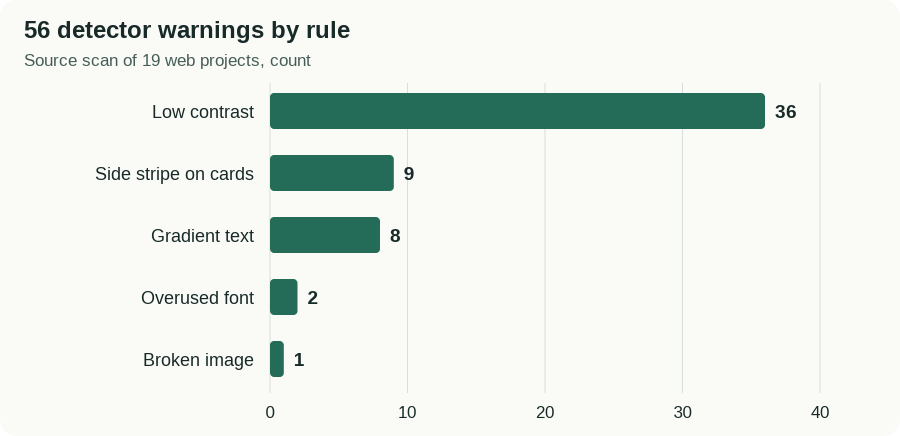
The largest group was low contrast between text and background: 36 findings, all from the HTML files of seven games. Next came a thick colored stripe down one side of a card (9 findings), then gradient text (8). People read both patterns as AI-made at a glance, and both showed up in our admin screens and games.
Source files such as tsx and css only get regular-expression pattern checks. Rules that need computed elements, like contrast, tiny text and touch targets, run only when you give the detector an HTML page or a live URL. The detector says so itself at the end of its output: the count is lower than the real number, so a quiet result on those files isn't proof the code is clean.
What turned up once the pages were opened
Give the same command a URL and it opens the page in Chrome or Edge and checks it there. We scanned our four shared in-house screen starters as static HTML first, then opened them in the browser at three widths: 375, 768 and 1440. That turned up two findings.
- In dark mode, the error message text had a contrast ratio of 3.2:1 against a 4.5:1 bar. The cause was our token generator. The state colors had separate values for dark backgrounds, but dark mode never switched to them. After the fix, the contrast is 7.7:1 or higher.
- The white text on the Naver login button had a contrast ratio of 2.3:1. But that's Naver's official button color, so we left it and marked the element as an exception with
data-impeccable-ignore="low-contrast", along with a reason.
The first one had been there for about a month. After the fix, we reran the four screens at three widths, 12 runs in all, and every one passed.
Why DESIGN.md goes alongside it
A detector alone can't catch what strays from your own standard unless it knows what that standard is. DESIGN.md from Google Labs is a format that puts a project's colors, type and spacing in YAML, with the reasons behind them in prose, all in one file. It's still in alpha.
We already had a token file, so rather than write a new one by hand, we added a script that generates the top part of DESIGN.md from the tokens. Two sources for the same values will drift apart sooner or later.
npx -y @google/design.md@0.4.0 lint DESIGN.mdreports a reference to a missing token as an error and low contrast between text and background as a warning. We deliberately added a pair with a contrast ratio of 1.68:1, and thecontrast-ratiorule caught it.- According to the docs, the exit code is 1 only when there are errors. Low contrast is just a warning, so if you want it in an automated check, you have to read the JSON output and fail on
contrast-ratioyourself. - When DESIGN.md is at the project root, the impeccable detector reads it. A font outside the standard showed up as a warning, and colors, radii and font sizes outside it as advisories. With the file removed, they didn't show up. That's how we found a single 22px value that was off the type scale in one real project.
Why we passed on the other four
We passed, but not because they're badly made. They just didn't fit our conditions.
- hallmark. It sorts checks into three tiers: rules with no exceptions, defaults an AI picks out of habit, and finishing details. It also builds the first screen itself and has a fresh session review it. We liked that and moved the tiers and their order into our in-house standard. But letting the tool choose the theme and page structure overlaps with the screen starters we already have. There's no release to pin, either. The lint scripts add up to about 330KB, more than we could read through, so we didn't run them.
- unslop. Its process is specific: audit, decide how much to change, set a direction, then fix things in the order of spacing, color, icons, copy, type, layout, details, visuals and motion. We also liked its rule that a screen with nothing wrong is left alone. It had been public for only two weeks, so we took the process and left the scripts out. It's CC BY 4.0, so we have to credit its author, Damir Sokolovsky.
- @shadcn/lint. Across our five Tailwind projects, we found no shadcn component config files, arbitrary-value utilities such as
p-[13px], or default palette colors. We lean on token CSS more than utility classes, so it had nothing to catch. We'll add it once a project uses shadcn/ui components. - Astryx. It's a design system, not a linter. It's built on React 19 and StyleX and is still in beta, so adopting it would mean changing our base stack.
What to watch for when installing
Read the README to the end and you'll find sentences that matter more than the install command.
- The impeccable design hook runs the detector every time the agent edits a file. That's convenient, but the docs say Claude Code hooks run separately from model approval. So check which hooks got installed before you leave an agent running unattended.
- In live mode, Apply runs
codexorclaudewith approvals and the sandbox turned off when no agent is in the conversation. Setting the environment variableIMPECCABLE_LIVE_COPY_AGENT=offdisables it. - A globally installed design skill triggers on its own in every session. If your team already has a design standard, the tool can steer screens somewhere else.
So our setup is the detector alone: no hooks, no global skills. We pin the version, as in impeccable@4.8.2, and read the changelog before upgrading. One reason we updated is that, starting with 4.8.0, the downloaded detection engine is compared against digests shipped in the package. Usage reporting is off, via DO_NOT_TRACK=1.
The mistake we made
We wrote the script that generates DESIGN.md, and it took the project name from the folder name. A file generated in a git worktree (a working copy in another folder) passed the check where it was made, then failed in the main folder and on two other machines, with a message saying it differed from the tokens. The folder names were different. We changed the script to read the name from package.json, and since then the check has passed on two Apple Silicon machines and one Intel machine.
The lesson: when you add a checking tool, running it only where you built it isn't enough.
A good place to start
- Scan the source first. Run
npx -y impeccable@4.8.2 detect src/and check the exit code: 2 means warnings; 1 means the scan couldn't finish. - Start the dev server, then scan the URL. Begin with a mobile width, as in
npx -y impeccable@4.8.2 detect http://localhost:3000 --viewport 375x812. - Put your colors, type and spacing in DESIGN.md, then check it with
npx -y @google/design.md@0.4.0 lint DESIGN.md.
A clean pass only means the rules found nothing, and a machine can only catch what its rules cover. So at the end, we still show screenshots to a different session from the one that built the screen and have it review them.
Frequently Asked Questions
Does the detector need an LLM or an API key?
No. The impeccable detector runs 62 fixed rules and never calls an LLM. The first run downloads the package and the detection engine from npm once.
Is passing the source scan enough?
No. Rules such as contrast, tiny text and touch targets only run when you scan an HTML page or a live URL. On tsx and css files only the pattern rules run.
Is @shadcn/lint useful if I don't use shadcn/ui?
According to its docs it works on any Tailwind v4 project without shadcn/ui. In code that leans on token CSS more than utility classes, though, it had almost nothing to catch.
Sources & Verification Date
- pbakaus/impeccable README and release notes (4.8.0 to 4.8.2) · Verified
- google-labs-code/design.md README and format spec (docs/spec.md) · Verified
- Nutlope/hallmark README and gates document (references/gates.md) · Verified
- heydamir/unslop README and SKILL.md (Damir Sokolovsky, CC BY 4.0) · Verified
- shadcn-ui/lint README · Verified
- meta/astryx README · Verified